
Website owners often face challenges in translating every page automatically. Not all content on a website requires translation, and translating unnecessary pages can increase costs, reduce efficiency, and create SEO issues. Many Autoglot users requested a solution that allows them to select which pages should or should not be translated.
Exclusion filters in Autoglot 2.11 prevent excess charges by giving administrators precise control over their website translations.
Introduction: Why Exclusion Filters Matter
Challenges Without Exclusion Filters
Without the ability to exclude certain pages, machine translation can generate content that is irrelevant or unnecessary. Pages like search results, attachment pages, or date archives often do not provide unique content for visitors. Translating these pages can waste resources and confuse readers. Additionally, translating pages that should remain unindexed may affect search engine optimization, potentially lowering the overall ranking of a website. Exclusion filters allow website owners to avoid these issues while keeping important content fully translated.
User Requests and Feedback
Customer feedback has consistently highlighted the need for selective translation. Users wanted the option to prevent specific pages from being processed automatically by Autoglot while still retaining the ability to display existing translations. This feature ensures that websites remain multilingual in the areas that matter most, while reducing unnecessary translation effort and cost.
Exclusion filters are a crucial update that improves translation control and efficiency. They respond directly to user feedback and solve common challenges related to translating irrelevant pages.
By preventing unnecessary translations and maintaining existing translations, Autoglot ensures a more streamlined, cost-effective, and SEO-friendly multilingual website experience.
See also: How to Automate Translation Process for WordPress?
Understanding Exclusion Filters
What Exclusion Filters Are
Exclusion filters are a feature that allows website administrators to control which pages Autoglot excludes from translation. Instead of translating every page automatically, these filters let you prevent specific content from being processed. This ensures that only relevant and valuable pages are translated, reducing unnecessary workload and translation costs.
Key Functionality
Exclusion filters maintain the visibility of existing translations while blocking new translations. If a page already has a translated version, Autoglot will continue to display it. However, no new translation will be generated for excluded pages. This approach balances content availability with efficient use of translation resources, giving administrators the flexibility to manage multilingual websites effectively.
Types of Exclusion Filters
Autoglot offers multiple ways to define which pages to exclude.
- URL Filters: You can exclude pages using URL patterns, including wildcards. For example, /blog/* prevents all pages under the blog section from being translated.
- Page Type Filters: Certain types of pages, such as search results, attachment pages, or category and date archives, can be excluded to avoid translating non-essential content.
Meta Robots Tag
Additionally, administrators can set the “meta robots” tag to “noindex” for excluded pages, preventing search engines from indexing them. This enhances SEO management and ensures that irrelevant content does not affect rankings.
Practical Examples
Exclusion filters allow targeted control over translation behavior. For instance, a website may exclude its internal search results and user-generated content while fully translating product pages and blog posts. Similarly, news websites can prevent older archive pages from translation while keeping the latest articles multilingual.
Exclusion filters provide precise control over translation priorities. They allow administrators to define which pages may remain untranslated, ensure existing translations remain accessible, and maintain SEO integrity. This feature helps optimize translation resources, improve translation ROI, and enhance the overall efficiency of Autoglot for WordPress websites.
See also: How To Measure Translation ROI?
How Exclusion Filters Work in Autoglot
URL Filters: Precise Control by Page Address
URL filters let administrators exclude specific pages based on their web addresses. This is particularly useful for sections of a website that do not require translation, such as internal blogs, promotional pages, or temporary campaigns.
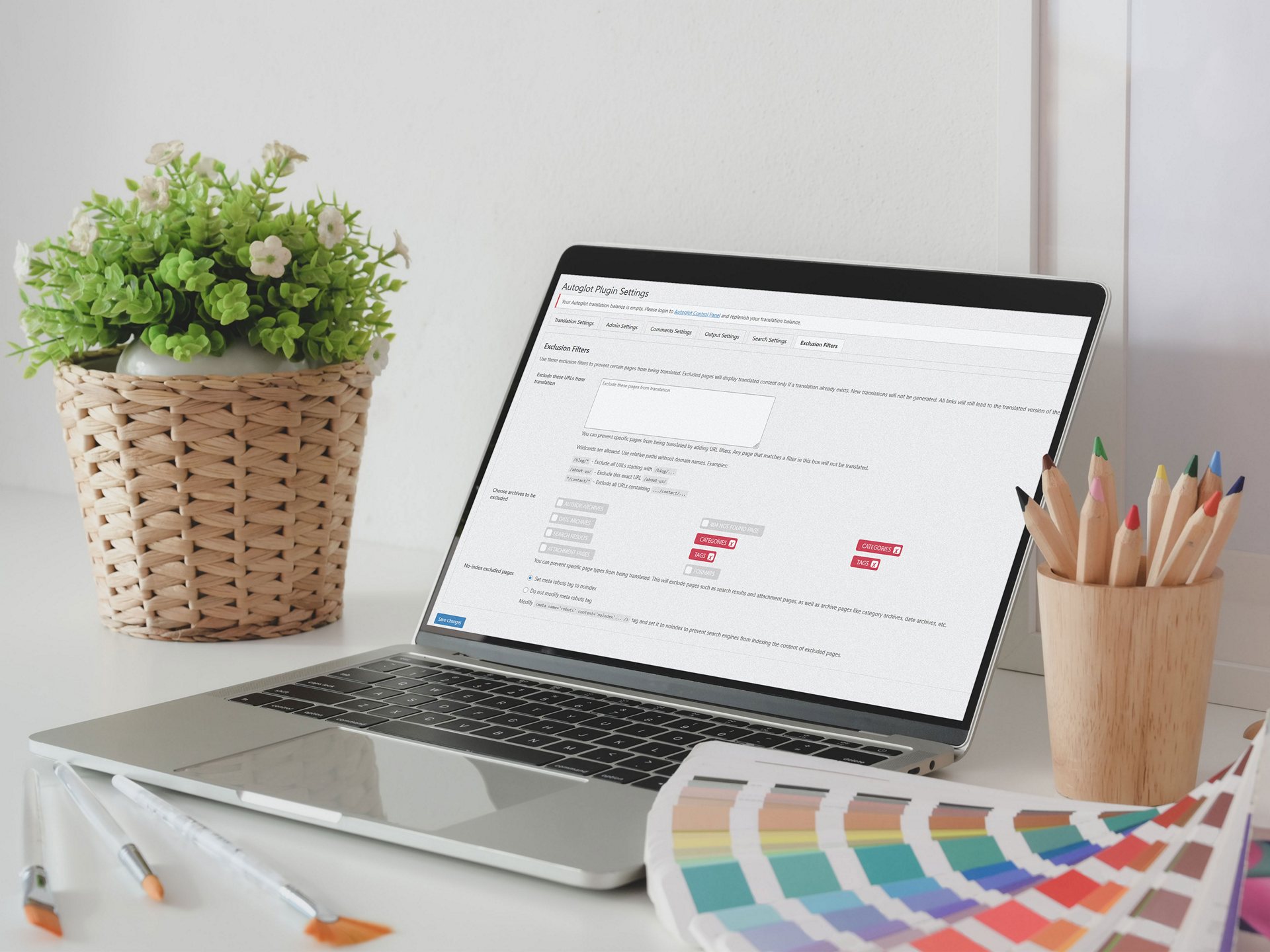
This option can be found in Autoglot Advanced Settings – Exclusion Filters. Site administrator can add as many filters as possible, one per line. Autoglot supports wildcard patterns, making it easy to exclude multiple pages at once. For example, using “/blog/*” will automatically prevent all pages under the blog section from being translated, without requiring manual selection for each page.
Administrators can combine multiple URL patterns to cover complex site structures. This allows for flexible exclusion rules that match a variety of page paths, including nested subdirectories. By defining clear URL filters, websites can avoid unnecessary translation of pages that do not provide value to international visitors, saving both time and cost.
Page Type Filters: Excluding Non-Essential Content
Page type filters target specific categories of pages that often do not need translation. This includes search results pages, attachment pages, and archives such as category, tag, or date-based listings. Translating these pages is usually unnecessary, as they contain repetitive or non-unique content that does not enhance user experience in other languages.
This option can be found in Autoglot Advanced Settings – Exclusion Filters. Site administrator can choose from existing taxonomy archives specific to their blogs. These are usually tag and category archives, but may include WooCommerce product categories and tags, as well as other archive pages such as date archives, author archives, etc.
Using page type filters ensures that only meaningful content is translated. For example, an e-commerce website can translate product pages while excluding archive pages or internal search results. This prevents redundant translations and improves overall site performance, both for users and for machine translation processing.
Meta Robots Tag: Controlling SEO for Excluded Pages
The meta robots “noindex” option is available for excluded pages. This feature prevents search engines from indexing content that is not translated or not intended for international audiences. Applying noindex helps maintain SEO quality by ensuring that irrelevant or duplicate content does not appear in search results, which could otherwise affect site rankings.
This feature works seamlessly with existing SEO strategies. Administrators can exclude specific pages from translation and ensure they are not crawled, while still allowing the rest of the site to benefit from full multilingual SEO optimization.
How Autoglot Handles Excluded Pages
Even when a page is excluded, Autoglot still displays existing translations if available. This ensures that users visiting the site in different languages can still access previously translated content without generating new machine translations for excluded pages. All internal links continue to direct users to the translated version of the site when available, maintaining a consistent multilingual experience.
This approach balances translation control with accessibility. It allows administrators to manage resources efficiently, prioritize important content, and maintain a professional appearance for international visitors.
Summary
Exclusion filters in Autoglot v2.11 offer multiple methods to control translations. URL filters, page type filters, and meta robots options give administrators flexibility to exclude irrelevant content while preserving essential translations.
This system ensures efficient use of translation resources, better SEO management, and a seamless experience for website visitors in multiple languages. By understanding and using these filters, WordPress site owners can optimize their multilingual strategy effectively.
Read more: Multilingual SEO
Benefits for Autoglot Users
- Exclusion filters help website owners save on translation costs. By preventing unnecessary pages from being translated, administrators reduce the number of machine translation requests. This is especially important for sites that pay per translated word or page. Resources can be focused on translating high-priority content, ensuring that money and processing power are spent efficiently.
- Administrators gain greater control over which content is translated. Pages such as search results, attachment pages, or archives often do not provide unique value. Exclusion filters allow these pages to remain untranslated, while ensuring that important sections like blog posts, product pages, or landing pages receive full translation coverage. This targeted approach simplifies content management and keeps the website organized.
- Exclusion filters help maintain strong SEO performance. Using the meta robots noindex option, administrators can prevent search engines from indexing excluded pages. This avoids potential penalties from duplicate or low-value content. At the same time, translated pages that are essential for SEO continue to rank effectively, preserving search visibility across multiple languages.
- Visitors still see existing translations for excluded pages. Autoglot ensures that all links on excluded pages direct users to the translated sections of the site when available. This maintains a seamless multilingual experience, even for pages that are not actively translated. Users can navigate the site without encountering untranslated content where it matters most.
Exclusion filters provide practical benefits for cost, management, SEO, and user experience. By allowing selective translation, Autoglot ensures efficient use of resources, better organization, stronger search engine performance, and a smooth experience for international visitors. This feature aligns with common requests from Autoglot users and improves overall site management.
See also: How to Manage Multilingual Content on WordPress Sites?
Other Enhancements in v2.11
- Autoglot v2.11 includes a small but impactful optimization in the search function. The update improves the speed and accuracy of search queries within the plugin settings. Site visitors can now locate pages, posts, and other content more efficiently, thus improving overall user experience.
- The Text Replacement module received minor bug fixes in this version. Previous versions occasionally caused minor inconsistencies in the dashboard. With v2.11, these issues have been addressed, ensuring that text replacements are applied correctly and consistently.
Although these changes may appear minor, they enhance the overall usability of Autoglot. Optimized search functionality and reliable text replacement support administrators in managing complex websites efficiently. When paired with the new exclusion filters, these updates ensure that translation tasks are streamlined and that important content is accurately maintained across languages.
Focus on Performance and Stability
Autoglot v2.11 emphasizes performance, stability, and user control. Every minor improvement contributes to a smoother experience for website owners. Faster search, accurate text replacement, and controlled translation exclusions work together to reduce potential errors and increase productivity. This allows users to focus on content strategy and multilingual growth rather than troubleshooting plugin issues.
Conclusion: Smarter, More Flexible Translations
The Value of Exclusion Filters
Exclusion filters in Autoglot v2.11 give website administrators precise control over translations. By selecting which pages to exclude, users can focus translation efforts on the most important content, while preventing unnecessary or low-value pages from being processed. This ensures a cost-efficient, organized, and SEO-friendly multilingual website.
Benefits for Users
With exclusion filters, administrators save time, reduce costs, and improve content management. Pages that do not require translation, such as archives, search results, or attachment pages, can remain untouched while existing translations stay accessible. Additionally, the meta robots noindex option helps maintain strong SEO by keeping excluded pages from being indexed by search engines. Visitors experience a seamless multilingual website, with all important content translated and internal links functioning correctly.
Website owners are encouraged to update to Autoglot v2.11 to take full advantage of these features. Exclusion filters empower users to optimize translation workflow, manage resources more effectively, and maintain SEO quality.
The plugin continues to provide automation while giving administrators the tools they need to customize translation behavior for their website.